
Analyzing the Public WhatsApp Avatar Behind a Number
Learn how WhatsApp avatar analysis evaluates public profile signals and algorithmic portrait estimates for individual numbers and asynchronous bulk lists.
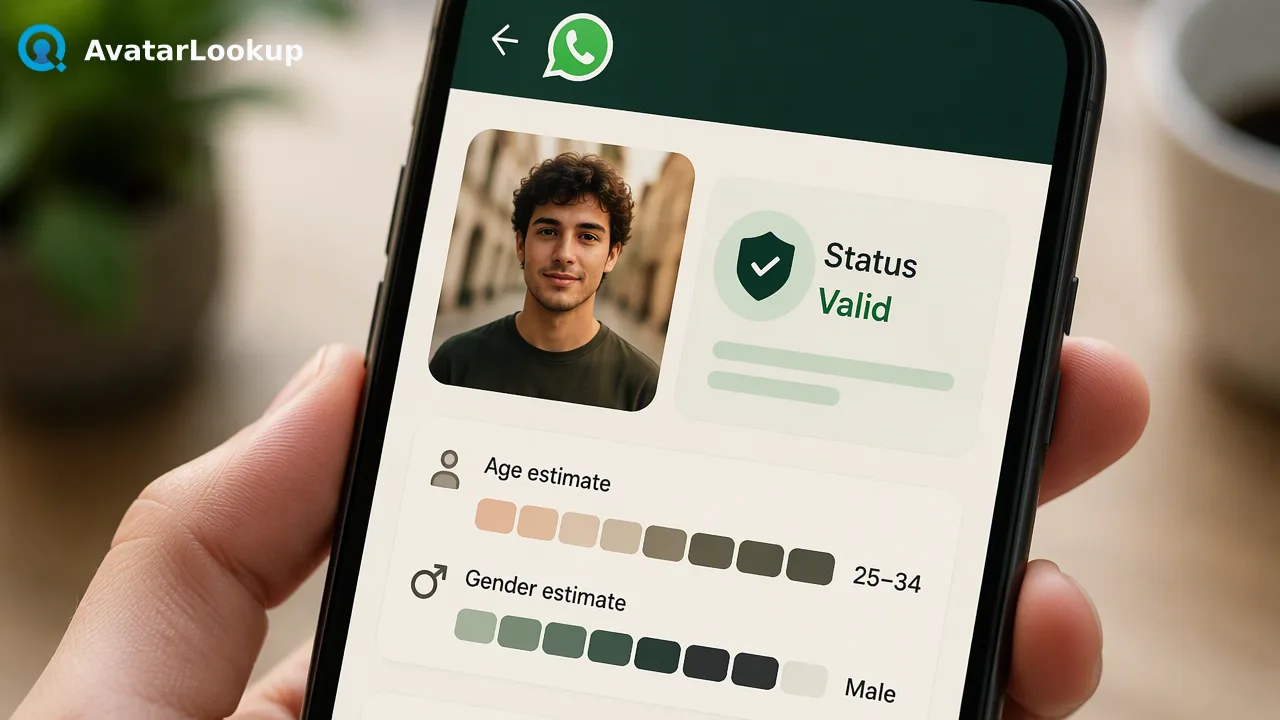
A practical guide to analyzing public WhatsApp avatars behind phone numbers using realtime single checks and asynchronous bulk workflows for contact-data enrichment.
WhatsApp avatar analysis evaluates public profile signals and algorithmic portrait estimates associated with a phone number to enrich contact-data workflows. While image profile analysis evaluates an uploaded image or public URL directly to estimate picture type, gender, age, hair, and skin color, WhatsApp avatar analysis serves as the route when all you hold is an identifier. Organizations use these public signals to observe profile status and appearance estimates at check time. These outputs serve as automated decision-support signals rather than verified demographic facts or identity verification, helping operational teams prioritize review pipelines across single records or asynchronous bulk datasets.
Public Avatar Analysis and Identifier Enrichment
AvatarLookup operates as an avatar analysis platform that examines visual media to assist contact enrichment workflows. When teams possess a raw photo, image profile analysis evaluates the image to estimate attributes such as portrait category, age range, gender, hair color, and skin color. However, contact workflows frequently begin without direct image files. When all you hold is an identifier, WhatsApp avatar analysis and email avatar analysis bridge the gap by inspecting check-time public profile data.
The analysis process retrieves the public avatar associated with the telephone number and applies algorithmic models to estimate portrait characteristics. Because users select their own public profile images, these signals provide context about whether a profile picture is present and what visual traits it displays. Rather than treating visual data as definitive identity confirmation, teams use these algorithmic estimates alongside other records to inform prioritization, routing, and contact hygiene workflows.
Realtime Single and Synchronous Multi Lookups
Organizations evaluating individual contacts or small batches can utilize realtime single checks and synchronous multi checks. The single-lookup workflow inspects a targeted phone number, returning the registration status alongside public avatar attributes and source-specific picture estimates.
For workflows processing small groups simultaneously, the synchronous multi-check capability accepts batches of identifiers of a single service type. In synchronous operations, the platform returns an ordered collection of results containing status flags and algorithmic estimates.
Submit the target phone number formatted with country digits into the single-check workflow.
Inspect the returned presence signal to observe account registration status at check time.
Evaluate public portrait attributes, including estimated age category, gender appearance, and category type.
Ingest the structured output into internal contact review queues or CRM pipelines for routing.
This real-time capability supports instantaneous operational reviews without waiting for deferred batch file generation.
Asynchronous Bulk File Processing Workflow
When handling large databases, organizations transition to the third layer: asynchronous bulk processing. The bulk workflow processes telephone lists packaged in TXT or CSV format with one identifier per line. Per-product limits apply to file submissions, and teams should consult current API documentation for applicable boundaries.
The bulk workflow follows three discrete phases:
File Submission: The client submits a country-coded identifier file via
POST /api/v1/bulk-tasks, setting the required country parameters.Status Polling: The platform returns a distinct task identifier. The client queries
GET /api/v1/bulk-tasks/{id}periodically to check task completion, spacing status requests appropriately.Data Retrieval: Once processing finishes, the task status provides a download link for a consolidated CSV export containing identifier, activated status, avatar URL, category, age, gender, skin color, and hair color.
Download links remain active temporarily and can be refreshed by querying the original task ID, ensuring resilient downstream data pipelines.
Interpreting Returned Attributes and Operational Signals
Interpreting avatar analysis outputs requires understanding the distinction between algorithmic estimation and identity records. Returned attributes—such as estimated age, gender presentation, or color classifications—represent model-derived evaluations of a visual image rather than demographic facts.
The returned indicators provide directional data for operational workflows:
Registration Signal: Confirms whether an account presence was reachable on the platform at check time.
Exists Indicator: In synchronous multi-record outputs, exists=true denotes that an analysis result was produced. An exists=false status indicates an undetermined, invalid, or failed processing state rather than proof of account absence.
Avatar Category: Differentiates between human portraits, non-human graphics, or empty avatar states. Completed checks that return non-human images, objects, or empty avatar fields represent determined evaluations.
Applying these distinctions helps teams utilize public visual signals responsibly while maintaining strict governance around automated customer classifications.
FAQ
Are algorithmic appearance estimates considered verified demographic facts?
Algorithmic appearance estimates reflect probabilistic visual evaluations of a public profile picture rather than verified demographic or legal facts. Public avatars often feature illustrative artwork, third-party photographs, or abstract graphics. Consequently, organizations should treat attributes such as estimated age, gender, and appearance categories as lightweight visual signals to inform operational review queues rather than using them for high-impact determinations.
How should organizations interpret an exists=false outcome in synchronous checks?
In synchronous multi-identifier checks, an exists=false value indicates that the request produced an undetermined, invalid, or failed outcome during processing. It represents the state of the check itself rather than providing a negative account verdict. Teams should treat these records as unresolved checks requiring secondary routing rather than assuming that the identifier completely lacks an underlying platform registration.
How do bulk processing workflows handle list requirements and limits?
Bulk processing accepts TXT or CSV files containing one identifier per line, formatted with country-coded digits. Bulk lists are submitted asynchronously via bulk task endpoints. Because specific file-size caps, minimum thresholds, and maximum volume allocations differ across services, per-product limits apply. Organizations should review the official API documentation to ensure their batch submissions align with current format specifications and quota constraints.
Learn More
Choose the product information that fits the next step in your workflow.