
Product guidance
How to Separate Available, No-Avatar, and Undetermined Results
Learn how to categorize available, no-avatar, and undetermined avatar check result categories in contact-data workflows and bulk processing operations.
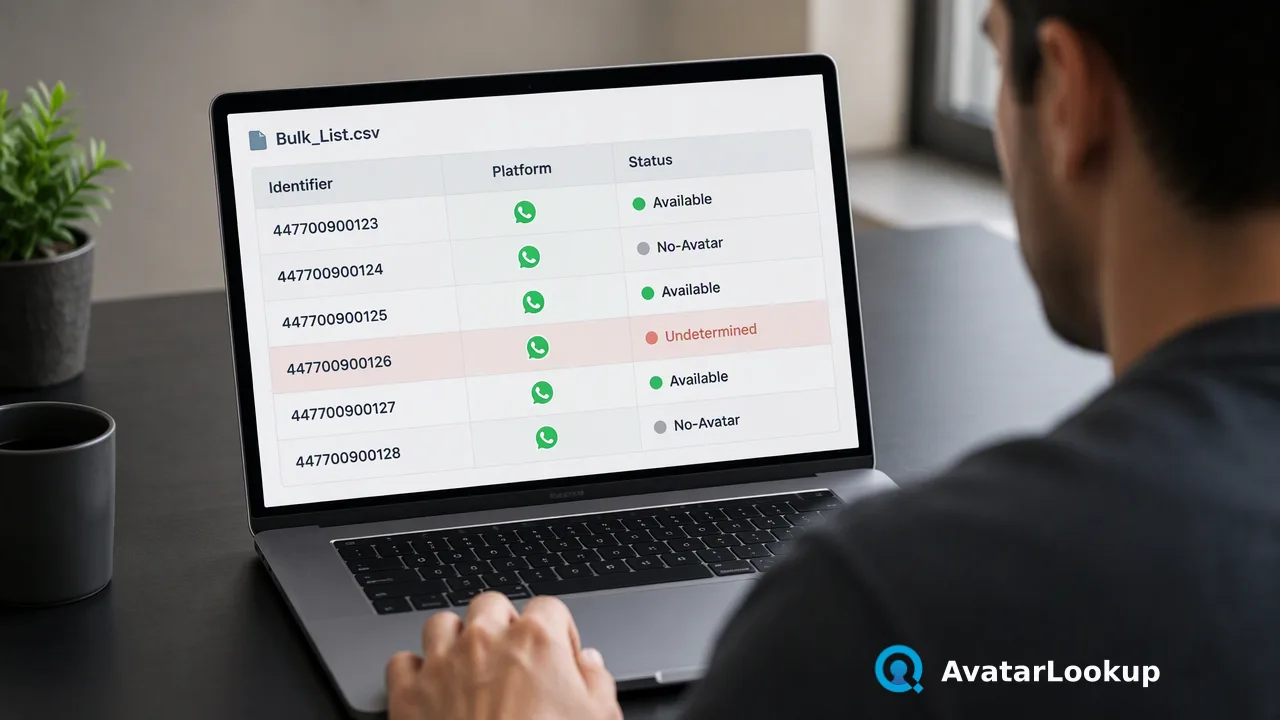
A practical workflow guide for categorizing public avatar analysis outputs into available, no-avatar, and undetermined buckets across single checks and bulk files.
Avatar check result categories should be systematically routed into three discrete operational buckets: Available, No-Avatar, and Undetermined. Teams implement this by first routing inputs through appropriate lookup methods—starting with direct image analysis or resolving public avatars from phone and email identifiers—and then categorizing the response. An Available status triggers algorithmic portrait analysis to extract auxiliary presentation attributes. A No-Avatar status records that no public profile picture was found at check time, allowing the contact record to proceed without portrait metadata. An Undetermined status routes the record to a separate queue for scheduled re-evaluation or alternative workflow handling.
Image Profile Analysis and Identifier-Based Lookups
Configuring a clean categorization pipeline begins with selecting the proper analysis method based on available source data. Teams handling existing image assets should use Image profile analysis directly.
Direct Image Analysis
Image profile analysis evaluates an uploaded image file or a public https URL in formats such as JPEG, PNG, WEBP, or GIF. This method analyzes the graphic content itself without requiring phone numbers or email addresses, returning algorithmic attributes that describe the visual portrait directly.
Identifier-Based Analysis
When teams hold only an account identifier, dedicated retrieval routes resolve public avatars before analysis:
WhatsApp Avatar Analysis: Retrieves and evaluates public avatars linked to phone numbers on WhatsApp.
Email Avatar Analysis: Retrieves and evaluates public avatars for supported email domains, specifically Gmail, Yandex, and Mail.ru.
Selecting the appropriate route ensures that public profile pictures are properly surfaced before downstream categorization rules execute.
Defining the Three Avatar Check Result Categories
To maintain reliable contact datasets, operational architectures must map every query response into one of three distinct statuses rather than reducing outputs to binary flags.
| Category | Documented Signal | Recommended System Action |
|---|---|---|
| Available | Public avatar retrieved successfully | Forward image to algorithmic attribute analysis |
| No-Avatar | Account has no public avatar set | Log presence of public identifier without portrait data |
| Undetermined | Status could not be definitively categorized | Route to retry queue or neutral review partition |
Appearance attributes derived from an Available result—such as picture type, gender, estimated age, hair colour, or skin tone—are algorithmic estimates from pixel data, serving solely as auxiliary reference points. A No-Avatar result simply confirms that no public image was returned at check time. Preserving the Undetermined category ensures that ambiguous lookups remain isolated from confirmed outcomes.
Operational Steps for Triaging Analysis Outputs
Organizations can implement a four-step triaging workflow to process incoming lookup responses reliably across contact databases.
Capture Raw Response: Ingest the raw check response from single-identifier endpoints or bulk file completion exports.
Branch on Core Status: Evaluate the primary status flag. Route Available records to visual enrichment, No-Avatar records to text-only contact queues, and Undetermined records to a secondary holding table.
Process Available Visual Data: For records with an Available status, ingest the algorithmic estimates. Store picture type, estimated age brackets, hair colour, skin tone, and gender estimates as auxiliary reference metadata.
Handle Exceptions and Retries: Maintain neutral classification for Undetermined rows. Schedule a deferred follow-up run or retain the record without visual tags, ensuring automated workflows proceed without interruption.
Bulk Ingestion and Data Minimization Practices
High-volume data operations use bulk processing to handle identifiers across multiple supported messaging channels and email providers.
Bulk File Formatting
Bulk ingestion supports TXT and CSV formats containing one identifier per line within documented per-product record and file-size limits, with JSON identifier arrays available as an alternative. Bulk capabilities cover dedicated services including WhatsApp avatar analysis · Bulk, Telegram number and username profiles, Viber, LINE, Zalo, MAX, and Email avatar check · Bulk.
Data Minimization Governance
Contact processing workflows must adhere to established data governance principles. Under Article 5(1)(c) of the EU General Data Protection Regulation, personal data must be adequate, relevant and limited to what is necessary for the purposes for which it is processed (GDPR Article 5 (Regulation (EU) 2016/679)). Teams apply this standard by storing only the specific visual attributes needed for internal contact workflows and discarding unnecessary metadata.
FAQ
How should systems process an undetermined avatar result?
An undetermined status indicates that the platform could not definitively resolve the public avatar state during the check. Automated systems should isolate these records into an auxiliary queue rather than treating them as negative outcomes. In bulk pipelines, keeping undetermined rows separate preserves raw output fidelity and allows teams to schedule an automated retry or flag the contact record for review.
What role do algorithmic appearance attributes serve in contact records?
When an avatar status is resolved as available, algorithmic analysis extracts descriptive portrait details such as picture type, gender, estimated age, hair colour, and skin tone. These attributes function strictly as auxiliary reference estimates derived from image pixels. Teams integrate them into contact records to provide descriptive visual context during manual reviews, maintaining internal metadata consistency across supported communication channels.
How are bulk identifier files structured for batch processing?
Bulk pipelines require plain TXT or CSV files containing one identifier per line within documented per-product file-size and record limits, or an equivalent JSON identifiers array. The bulk engine processes supported messaging and email identifiers asynchronously, outputting clear avatar status flags alongside identifier values. Downstream routing logic then sorts the resulting rows into available, no-avatar, and undetermined data partitions automatically.
Learn More
Choose the product information that fits the next step in your workflow.