
How to Check Multiple Email Avatars: Multi Calls or Bulk Files
Compare synchronous multi requests, dashboard checks and asynchronous bulk files for supported Gmail, Yandex and Mail.ru email avatars.
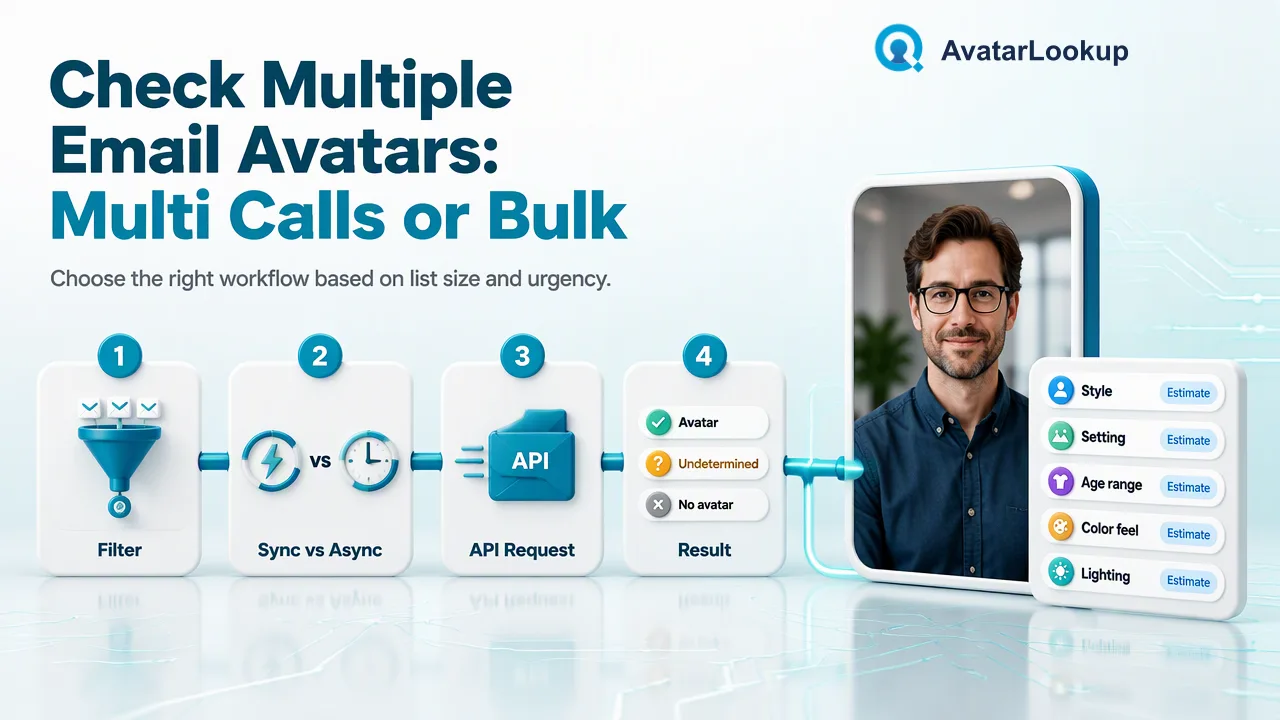
The right way to check several email avatars depends on list size and whether the result is needed now.
To check multiple email avatars, first filter the list to AvatarLookup’s supported Gmail, Yandex and Mail.ru domains. For a small group, use a synchronous multi request for one service type; the dashboard can handle a larger set one by one. For a qualifying file, use the asynchronous email avatar bulk product and download its CSV when the task succeeds. None of these routes turns a missing public photo into proof that the mailbox is absent.
Filter the addresses before choosing a workflow
The supported email-avatar sources are Gmail, Yandex and Mail.ru families. Check the full domain list in AvatarLookup’s API documentation rather than assuming every address ending in a familiar country code belongs to a supported provider. Keep the original address intact, remove accidental whitespace and identify duplicates before submission. If a contact record has several addresses, decide which one the team is authorized to process; do not silently substitute a different address after a failure.
Separate unsupported domains into a review bucket. A corporate email address, for example, should not be sent to a product that only documents selected consumer-provider domains. Also keep syntactically invalid addresses separate from valid but unsupported ones. They are different data-quality problems and should not be reported as “no avatar.” This preparation makes the final counts meaningful: eligible checked records, excluded records and outcomes that need manual follow-up.
Google’s profile discovery guidance shows why public image visibility is a user-controlled property. Even an eligible Gmail address may not expose a usable public avatar to a particular check. A data team should use “public avatar available” as its label, not “real person found” or “email verified.”
Use synchronous multi requests for a small active set
AvatarLookup documents POST /api/v1/batch-check for synchronous multi-identifier requests for one selected service type. For supported email-avatar analysis, one request can contain a documented small group and returns ordered JSON. This route fits a contact-data interface that needs a response during an active operation, such as reviewing a small set of records before an import is approved. The dashboard offers a separate option for a larger set that it processes one by one.
Keep the request homogeneous. Mixing phone numbers and email addresses or different service types in one multi request would obscure the source and is outside the documented shape. Map each returned item back to its submitted address by the documented order, then store the selected service and check time. Do not infer an account verdict from the exists marker: in this multi-result context it says whether a result was produced, while false can mean invalid, undetermined or failed.
A small test set should include a known eligible address with a visible photo, another eligible address without an obvious public photo, an unsupported domain and a malformed address. The goal is to verify the team’s classification and UI wording, not to claim an accuracy rate. The integration should clearly distinguish a completed observation from an item that produced no usable result.
Use an asynchronous file for a qualifying larger list
The email avatar bulk product accepts TXT or CSV with one email address per line. Unlike phone-based bulk products, the email product does not require a country field. Submit the file through the documented bulk-task route, retain the task reference, check status at the documented cadence and download the CSV after success. Product-specific file and count limits apply; consult the current product documentation during file preparation.
The bulk route is a different operational pattern from a synchronous multi call. Submission starts work; it does not return the completed list of avatar results. Build a simple task log with the selected product, input file version, submission time, status checks and downloaded artifact. If the task fails or is still processing, keep those records out of any “checked” tally. Do not invent a completion deadline or retry cadence beyond the published guidance.
Choose bulk when the team can process results later and has enough eligible addresses for the selected product. Choose synchronous multi when a smaller active group needs results in the request response. Choose the dashboard when a person is reviewing a moderate set without building an API integration. These choices are about timing, input shape and review process, not different kinds of identity evidence.
Read the result without overstating it
For a synchronous multi request, use the product’s documented result semantics and keep result-produced, negative avatar and undetermined outcomes distinct. For the email bulk product, read the downloaded CSV using that product’s own columns. In either case, an empty image field should not be interpreted as proof of no account or no mailbox. Public-photo availability is narrower than email deliverability or identity confirmation.
A useful contact-data update policy can be written before processing: attach an available public image only where the organization has a basis to use it; leave an existing record unchanged when the result is undetermined; and send conflicting records to manual review. Preserve the source and time so another teammate can understand how the observation was made. Avoid replacing a customer-provided picture automatically with a public one just because an avatar URL appeared.
After a trial run, compare the processed-address count with the eligible-input count and inspect a sample of each outcome class. If unsupported domains accidentally entered the checked set, fix filtering first. If the UI labels “no result” as “no account,” correct the label before expanding the workflow. Good classification is more important than making every row appear complete.
FAQ
How can teams choose between multi and bulk email avatar checks?
Use synchronous multi for a small active set; use the email avatar bulk task when an eligible file can be processed later under that product’s limits.
How can teams handle unsupported email domains?
Separate them before submission and report them as unsupported rather than as checked addresses without avatars.
How can teams interpret exists=false in a multi result?
It means no result was produced for that item and can cover invalid, undetermined or failed checks; it is not an account verdict.
How can teams use an available avatar URL?
Treat it as public-image context under the organization’s data-handling rules. Do not treat it as identity or mailbox verification.
Learn More
Choose the product information that fits the next step in your workflow.