
Product guidance
Scaling Identity: How to Automate Batch Avatar Generation for User Databases
Learn how automated user avatar generation, deterministic seeds, and bulk public-avatar detection support scalable visual data management.
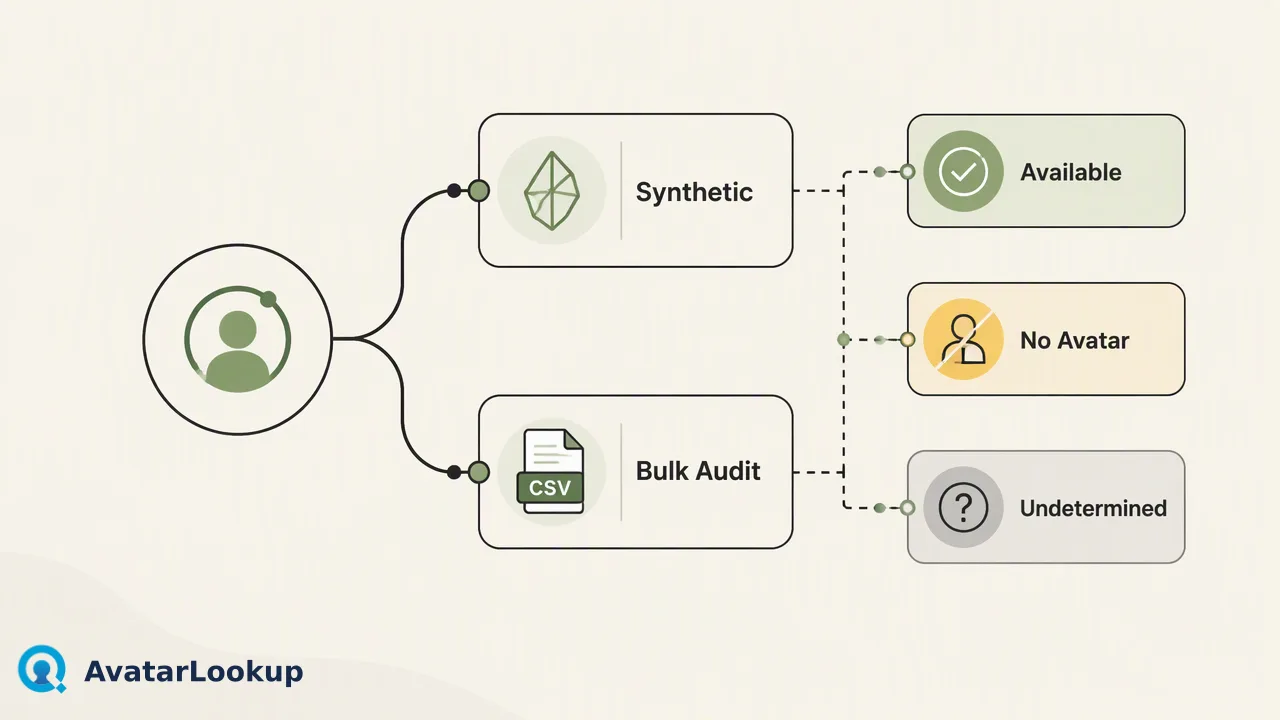
Discover how automated user avatar generation using deterministic seeds and bulk public-avatar auditing helps technical teams maintain scalable visual consistency across user databases.
Scaling identity management across large databases combines automated user avatar generation for synthetic visual fallbacks with bulk public-avatar detection for existing contact records. Organizations use deterministic seeds within command-line workflows to generate consistent, lightweight visuals based on unique identifiers, ensuring that identical inputs yield identical images without storing heavy media files. In tandem, operational auditing via bulk file ingestion allows technical teams to review public-avatar signals across supported messaging and email platforms. This dual approach gives systems a structured way to maintain interface visual consistency, map assets cleanly to user records, and inform contact data workflows without manual overhead.
Deterministic Seeds in Automated User Avatar Generation
Automated user avatar generation relies heavily on deterministic seeds to create scalable, reproducible visuals across user databases. Instead of requiring users to upload custom images during onboarding or maintaining extensive media storage arrays, systems can pass a unique user record key—such as a user ID, hash, or username—directly into a rendering algorithm. A deterministic seed ensures that the same input always yields the exact same visual output, guaranteeing visual consistency every time a profile component loads. Executing this generation through command-line interface (CLI) tools enables operational efficiency during database migrations or initial system seeding. Teams can script bulk image production directly within continuous deployment pipelines or local batch scripts. Because the visuals derive algorithmically from persistent seeds, organizations avoid visual fragmentation across decentralized user touchpoints while drastically cutting operational storage requirements.
Balancing Output Formats for Interface Performance
Selecting the appropriate file format is a critical operational decision when deploying automated user avatar generation at scale. Different formats balance rendering fidelity, network payload size, and browser compatibility across diverse interfaces:
- SVG (Scalable Vector Graphics): Best suited for clean geometric and illustrative avatar designs. SVGs maintain crisp lines at any screen resolution, scale infinitely without pixelation, and yield minuscule file footprints that can be embedded directly inline within DOM structures. - WebP: An optimal choice for photorealistic or pre-rendered raster avatars. WebP provides superior lossy and lossless compression compared to traditional standards, significantly reducing bandwidth demands on high-traffic profile directories. - PNG: Useful for workflows requiring universal legacy client compatibility or explicit alpha transparency where WebP encoding may not be natively supported across older edge devices. Establishing structured rendering pipelines that output standardized dimensions prevents layout shifts and improves client-side performance across web and mobile applications.
Auditing Existing Records with Bulk Public-Avatar Detection
While synthetic generation provides predictable placeholders for new accounts, auditing existing contact databases requires evaluating real-world profile signals. AvatarLookup is a focused public-avatar detection platform for teams that need to review supported account identifiers in contact-data workflows. Rather than generating synthetic placeholders, bulk avatar detection inspects whether external public accounts possess active avatar assets. For high-volume contact audits, bulk tasks support WhatsApp, Telegram, Viber, LINE, Zalo, MAX, Gmail, Yandex, and Mail.ru. Technical teams can submit bulk files containing up to 100,000 entries in CSV, TXT, or XLSX formats, provided the file size remains under 10 MB. Note that while single checks are available for WhatsApp, Gmail, Yandex, and Mail.ru, platforms like Telegram, Viber, LINE, Zalo, and MAX function strictly as bulk-only sources. This asynchronous bulk review provides critical context for organizations auditing large-scale communication lists.
Metadata Conventions and Core Signal Interpretation
Integrating both synthetic assets and external avatar signals into central databases demands strict metadata conventions and precise signal interpretation. Generated avatars should follow predictable file-naming standards—such as linking files directly to internal user UUIDs—to ensure relational databases map assets accurately without complex lookups. When ingesting bulk detection data, AvatarLookup categorizes outcomes into three distinct core results: avatar available, no avatar, and undetermined. It is vital to interpret these states accurately:
- Avatar available: Confirms that a public avatar exists for the queried identifier at check time. - No avatar: Indicates no public image was detected; this does not mean the underlying account does not exist. - Undetermined: Represents an inconclusive lookup state rather than a negative result.
FAQ
How do deterministic seeds support automated user avatar generation?
Deterministic seeds use a constant input value, such as an internal user ID, to produce an identical graphical output every time the algorithm executes. This guarantees that user profiles maintain consistent visuals across interfaces without requiring manual image uploads or persistent disk storage for rendered files, streamlining visual identity management across large databases.
What file formats and limits govern bulk avatar detection workflows?
Bulk tasks in AvatarLookup accept CSV, TXT, and XLSX files containing up to 100,000 entries, with a maximum file size limit of 10 MB. These tasks process supported messaging and email identifiers across platforms such as WhatsApp, Telegram, Viber, LINE, Zalo, MAX, Gmail, Yandex, and Mail.ru.
Learn More
Choose the product information that fits the next step in your workflow.